Running an AI Coding Swarm Across My Servers
Most AI coding still works like a single chat window — one prompt, one wait, one pane. Here's how I turned Claude Code and Codex into tmux-native background processes spread across my servers, and the four open-source tools that hold the swarm together.

Daniel Moya
In one breath: I run several Claude Code and Codex agents at once, across multiple servers, by treating each one as a
tmux-native background process rather than a chat window I have to sit in front of. Four open-source pieces hold it together — Claude-B, agent-mesh, HeliosDB CodeKB MCP, and the Claude Dashboard. The human still reviews, merges, and ships. The human just stops being the bottleneck.
For most of the last year, my AI coding workflow looked like everyone else's: open a terminal, start one assistant, hand it a task, wait, review, repeat. It is a perfectly good loop — until your day stops being one task at a time.
Mine rarely is. On any given afternoon I'm moving between HeliosDB, infrastructure scripts, migration tooling, dashboards, background services, and client work. Some of that is a good fit for Claude Code. Some of it is sharper when Codex pushes back. Some of it needs a reviewer, or a test runner watching the result, or simply belongs on a different machine entirely.
So the interesting question stopped being "can AI write code?" — it clearly can — and became something more operational:
How do I run and supervise many AI coding agents, across many servers, without babysitting every terminal?
That question is what turned a handful of scripts into what I now think of as an AI coding swarm.
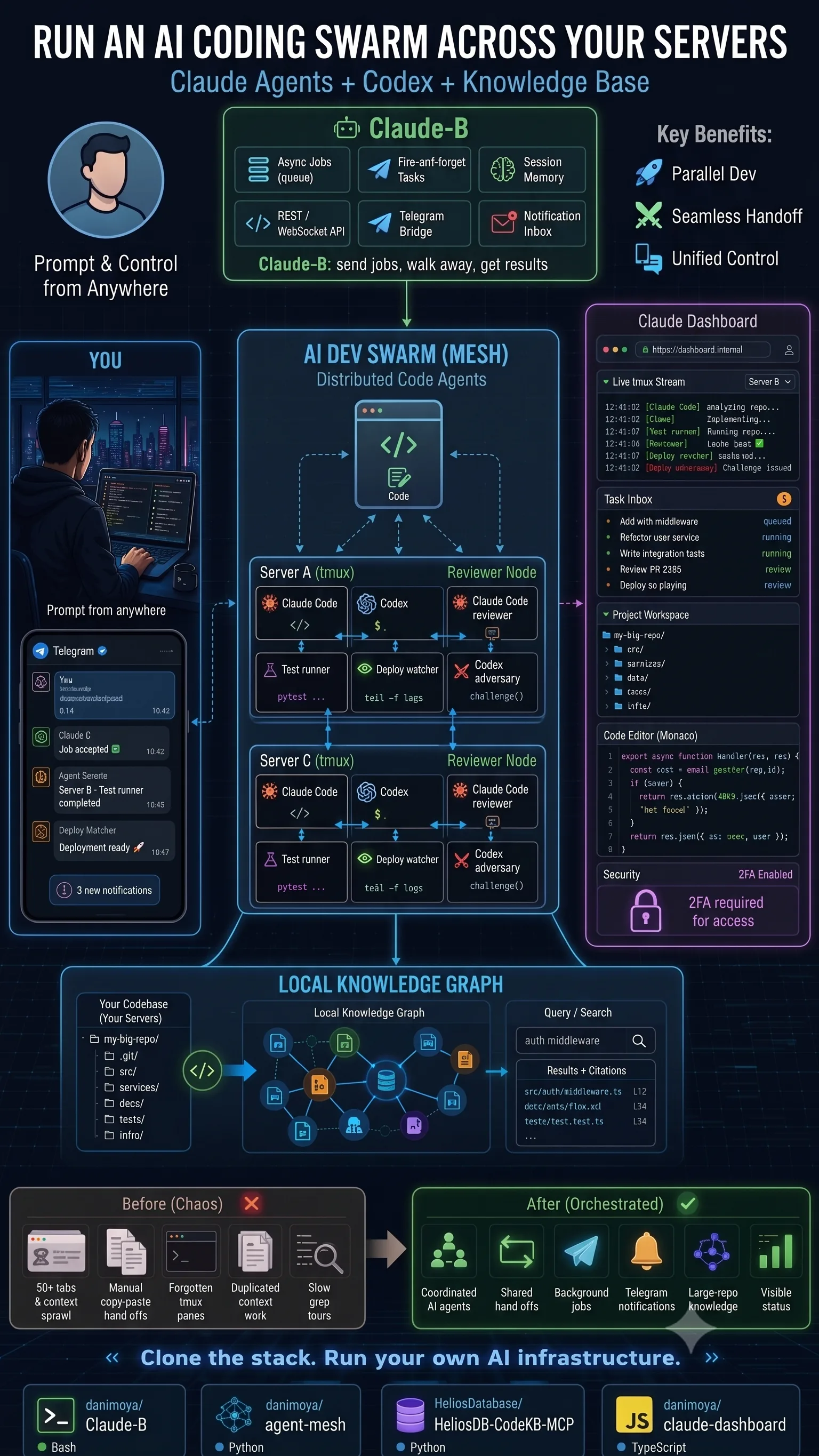
The Stack at a Glance
The swarm is deliberately split into four small, single-purpose, open-source repositories. Each solves one problem well, and you can adopt them independently.
| Repository | What it is | The problem it solves |
|---|---|---|
| Claude-B | Background-job layer for Claude Code | Turns a synchronous chat into fire-and-forget jobs with an inbox, APIs, and Telegram |
| agent-mesh | Coordination fabric for agents | Makes handoffs between panes, sessions, and hosts visible and intentional |
| Claude Dashboard | Browser cockpit | Answers "what's happening right now, and what needs me?" across every machine |
| HeliosDB CodeKB MCP | Local code memory over MCP | Gives agents files, symbols, and citations in large repos instead of re-grepping |
The rest of this post is the story of why each piece exists — and how they add up to something more useful than the sum.
The Real Problem: AI Coding Is Still Too Synchronous
Developers stopped working synchronously a long time ago. We start builds and walk away. We leave tmux sessions running. We SSH between machines, tail logs, run a test suite in one pane while editing in another, and lean on scripts, queues, and notifications to keep it all moving.
Most AI coding workflows, by contrast, still behave like a single interactive chat:
- Open one terminal.
- Send one prompt.
- Wait.
- Hand-copy context from somewhere else.
- Switch panes.
- Repeat.
That is fine for a small, self-contained task. It falls apart the moment you want several coding sessions running in parallel — let alone spread across multiple servers. What I actually wanted was closer to an operations setup than a chat:
- Claude Code building a feature, while Codex reviews it adversarially.
- A separate agent writing tests, and a deploy watcher tailing staging.
- Background jobs that keep running while I move to the next project.
- The ability to drive it from Telegram when I'm nowhere near the keyboard.
- Large-repo context kept warm, so every agent isn't rediscovering the same files.
None of this is a bet on full autonomy. The goal is more grounded than that:
A mission-control layer for supervised, parallel AI development.
The Mental Model: Treat Agents Like Unix Processes
My background is databases, Linux, migrations, and systems that have to stay up. So my instinct was never to build another chat UI — it was to treat an AI coding session the way I'd treat any long-running process. I want to start it, attach and detach, watch its output, push it to the background, get notified, coordinate it with its neighbors, preserve its state across a dropped connection, and run it on whichever host makes sense.
Write that list down and the architecture chooses itself: it should be tmux-native. Each agent lives in a pane or a session; the work continues server-side even when my laptop sleeps; I can re-attach later, see exactly what happened, and carry on.
Once that worked on one machine, the next step was obvious — what if several machines could take part in the same workflow? That's the point where a collection of sessions becomes a swarm.
The Four Pieces
Claude-B — Background Jobs for Claude Code
Repo · github.com/danimoya/Claude-B — Run Claude Code in the background. Dispatch a prompt, do other work, check the result later.
Claude-B is where the swarm started. The idea is almost embarrassingly simple:
cb "Analyze this module and propose a refactor"
…and then walk away. The job runs detached, and when it finishes the result reaches me through whichever channel I'm near — the inbox, a terminal notification, the REST/WebSocket API, or Telegram.
What it gives me:
- Async, fire-and-forget jobs — long tasks run detached instead of holding a window hostage.
- Persistent sessions that survive disconnects.
- REST & WebSocket APIs to wire it into anything else.
- Telegram integration and a notification inbox, so results come to me.
- Voice-message prompting — speak a task from my phone and let it become a proper prompt.
The shift is subtle but it changes everything: Claude Code stops being something I watch and becomes something I dispatch. When ten projects are open at once, that's the difference between flow and gridlock.
agent-mesh — Agents Talking Across Panes and Hosts
Repo · github.com/danimoya/agent-mesh — The coordination fabric that lets agents hand work to each other across panes, sessions, and servers.
The moment you have more than one agent running, coordination becomes the bottleneck. Chaos is the default: one agent edits a file and another never finds out, a reviewer works without context, tests run against stale state, two panes quietly do the same work, and every handoff happens through copy-paste.
agent-mesh is the layer that fixes this. It lets agents communicate across tmux panes, tmux sessions, servers, projects, and task roles — so a topology like this becomes something you can actually run:
Server A
  Claude Code      → implement feature
  Codex            → review the design
  Test runner      → watch for failures

Server B
  Claude Code      → inspect the diff
  Codex (adversary)→ challenge assumptions
  Deploy watcher   → monitor staging logs

Server C
  Docs agent       → keep docs in sync
  Migration check  → validate schema moves
  Integration tests→ run end-to-end
The win isn't that each agent is "autonomous." The win is that the handoffs become visible and intentional: Claude implements, Codex challenges, a test runner verifies, another agent summarizes, the dashboard reflects status, and Telegram pings me only when a human is actually required. It feels far more like a distributed terminal workflow than a chatbot.
Claude Dashboard — One Cockpit for Every Agent
Repo · github.com/danimoya/claude-dashboard — A browser control plane over a swarm that still runs tmux-native and server-side.
Terminals are powerful, but once enough agents are live, visibility is the next thing to break. I wanted a single browser cockpit that shows live tmux streams, task inboxes, running jobs, project workspaces, agent status, code context, security state, and remote sessions — all in one place.
It isn't there to replace the terminal; it's there to make the whole system observable. When work is scattered across machines, the only question that matters is:
What is happening right now, and which task needs my attention?
The dashboard exists to answer exactly that, without pulling the actual work out of tmux.
HeliosDB CodeKB MCP — Memory for Large Repositories
Repo · github.com/HeliosDatabase/HeliosDB-CodeKB-MCP — A local code-knowledge layer that serves files, symbols, and citations to agents over MCP.
Small projects don't need a knowledge layer — an assistant can read the files, grep around, and understand the structure in minutes. Large repositories are a different animal, and the same failure modes repeat: the agent re-searches the same files, context gets duplicated, architectural decisions are forgotten, symbols are hard to trace, docs drift away from code, and answers arrive without a citation back to the source.
That's the gap HeliosDB CodeKB MCP fills. It's strictly optional — I only reach for it when a repo is big enough to justify it — and it exposes a local code-knowledge layer of files, symbols, documentation, relationships, search, citations, and relevant code paths. Claude Code or Codex then query the codebase through MCP instead of rediscovering it from scratch. No magic; just better local memory where local memory pays off.
Before and After
The contrast is the whole pitch in one table:
| Before — manual terminal chaos | After — a supervised swarm | |
|---|---|---|
| Tabs & panes | Too many tabs, forgotten panes | Tracked, server-side, re-attachable sessions |
| Context | Copy-paste, repeated repo exploration | Shared inbox + MCP memory + explicit handoffs |
| Coordination | Agents running blind to each other | agent-mesh routes work between agents and hosts |
| Visibility | No clear status anywhere | One dashboard cockpit and Telegram alerts |
| The bottleneck | Me, the operator | The human decides — and stops babysitting |
With one assistant, the "before" column is annoying but survivable. With five, ten, or more parallel sessions it becomes genuinely painful — and the failure mode is never that the AI can't help. It's that I become the bottleneck.
Here's how a task actually moves through the "after" version:
- I send it from a terminal, the browser, or Telegram.
- Claude-B starts it as a background job.
- The agent runs in tmux on the right server.
- agent-mesh coordinates the handoffs between agents, panes, and hosts.
- Codex challenges or reviews what Claude produced.
- Test runners and deploy watchers keep an eye on the result.
- The dashboard shows live state.
- Telegram pings me only when attention is required.
- For large repos, CodeKB MCP hands agents real memory and citations.
I still read the code. I still decide what merges. I still decide what deploys. I still own the system. I simply no longer babysit every prompt — and that was the entire point.
A Few Deliberate Choices
Why Claude and Codex? Because I want them to disagree. Claude Code is strong across a wide range of coding and reasoning work; Codex is a valuable second perspective for implementation and review. With both on the table, I'd rather not pick a favorite — I'd rather pit them against each other:
Claude Code         → implement the feature
Codex               → review it, hunt for edge cases
Claude Code (review)→ refactor against the criticism
Test runner         → verify the behavior
Codex (adversary)   → challenge the final design
That isn't blind trust in AI. It's the opposite — value comes from making the agents check each other while a human keeps the final call.
Why tmux? Because it already solved, years ago, half the problems AI tooling keeps trying to reinvent: persistent sessions, pane-based workflows, remote attach/detach, server-side execution, resilience across flaky networks, and a natural fit with SSH. I don't want my AI workflow trapped in a single browser tab — I want it running where my projects already run.
Why Telegram? Because the good ideas rarely wait for me to be at the keyboard. On a train platform, mid-walk, or remembering a bug at the worst possible moment, I want a remote-control surface — not for deep review, but for dispatching jobs, checking status, and getting notified. For that, it's hard to beat.
What This Is — and Isn't
Let me be precise about the boundaries. This stack does not claim to be:
- ❌ Fully autonomous production deployment
- ❌ Guaranteed-correct AI-generated code
- ❌ Benchmarked productivity gains
- ❌ Magic understanding of huge repos
- ❌ A replacement for human review
- ❌ A hosted SaaS product
It is a self-hosted developer-infrastructure experiment, built for people who already know that AI coding assistants are powerful and messy, stateful, and operationally awkward. All it tries to do is make that reality more observable, more parallel, and more Unix-like.
You'll probably get value from it if you live in terminals, lean on tmux, run multiple servers, self-host your tooling, use Claude Code or Codex heavily, work across several repositories, like adversarial review between models, and want background jobs you can drive from your phone. You probably won't if you just want a single-agent chat UI.
Get the Code
Everything is open source. Clone only the pieces you need — none of them require the others:
| Start here if you want… | Repository |
|---|---|
| Background Claude Code jobs (and the foundation) | Claude-B |
| Multi-agent coordination across hosts | agent-mesh |
| A browser cockpit over the swarm | Claude Dashboard |
| Local memory for large repositories | HeliosDB CodeKB MCP |
Direct links, for the copy-paste crowd:
- Claude-B — https://github.com/danimoya/Claude-B
- agent-mesh — https://github.com/danimoya/agent-mesh
- HeliosDB CodeKB MCP — https://github.com/HeliosDatabase/HeliosDB-CodeKB-MCP
- Claude Dashboard — https://github.com/danimoya/claude-dashboard
The Takeaway
AI coding tools have become genuinely capable. The workflow around them still feels stuck at version one — a single interactive prompt. What developers actually need is the same infrastructure we've always needed around powerful tools:
queues · sessions · logs · dashboards · notifications · handoffs · memory · review loops · failure visibility
That's what I'm building here. Not an autonomous developer — a better cockpit for the human one, designed to run several AI coding agents across their own infrastructure.
If you run your own servers, live in tmux, and want Claude Code and Codex to behave more like background Unix processes than browser chats, this stack is worth a look.
Clone it, test it, break it — and tell me what should be better.

Written by
Daniel Moya
CTO @ GPC | Architect of HeliosDB | Senior Oracle AI DBA | Cloud Migration Expert
Enjoyed this article?
Share it with others who might find it useful.
Stay Updated
Get notified about new posts
Have questions about this topic? Ask my AI assistant for more details.
Ask AI Assistant